vMix API
Writes text into title template fields through vMix’s own connection (default 127.0.0.1:8088).

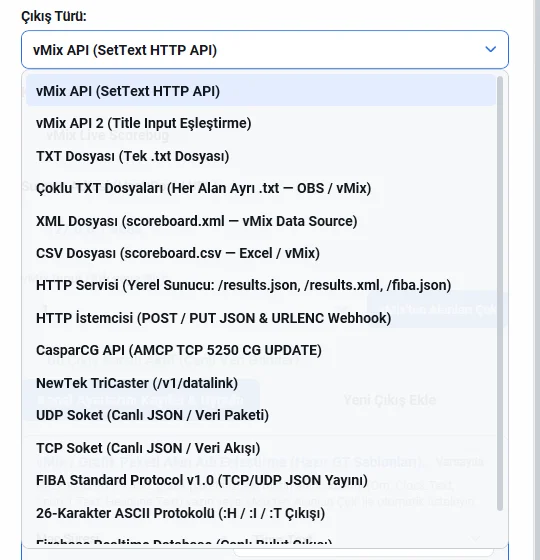
The program sends the score out in 15 different ways: streaming software connections, files, a local data service, webhooks and network sockets. Use as many as you like at once.
Works directly with vMix, OBS, CasparCG and TriCaster.
JSON, XML, CSV and text files; your own software reads them easily.
Several outputs at once; sent as soon as data changes.
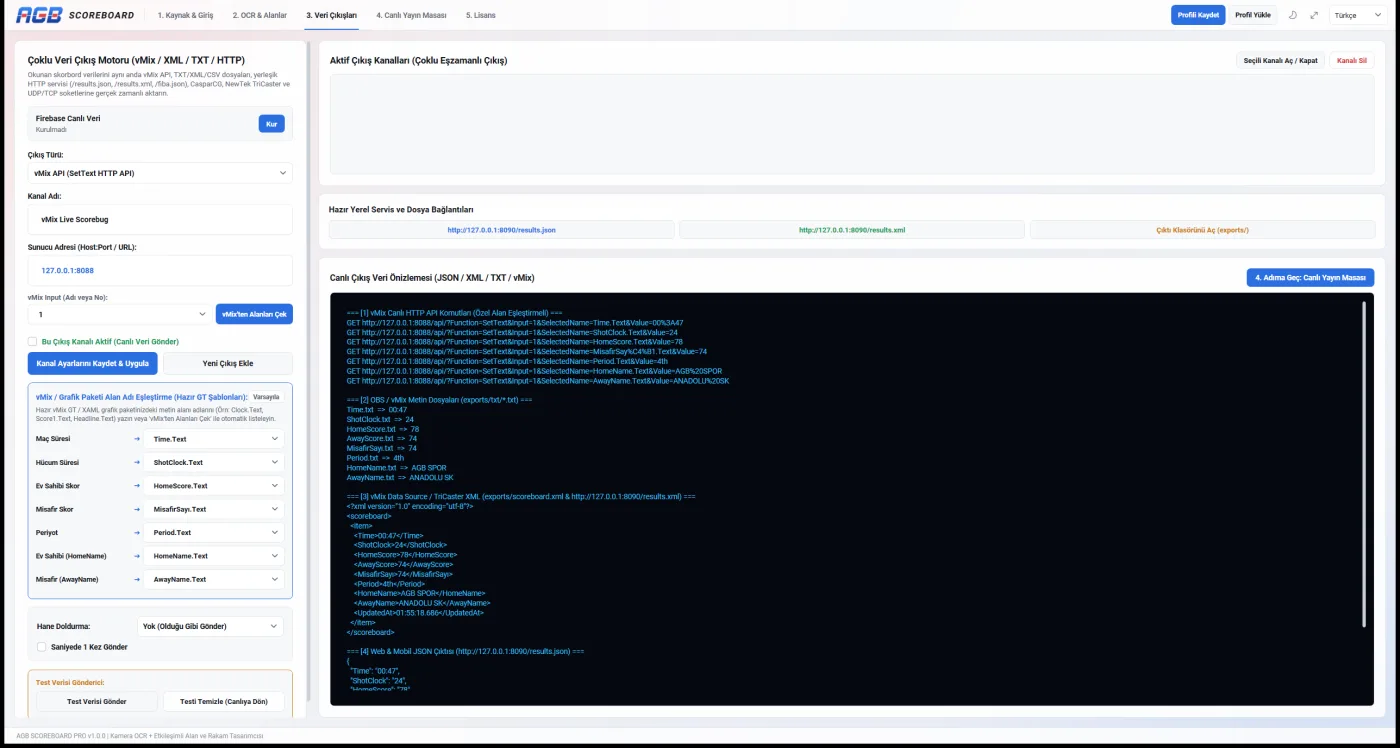
Through vMix’s own connection, the program fills the text fields of your title templates. The “Get fields from vMix” button lists the titles and fields in the open vMix; you pick from a list which field the score, clock and team names go to.
Only changed fields are sent; vMix isn’t loaded down and the graphic doesn’t stutter.
Besides vMix, OBS, CasparCG and TriCaster: text, XML and CSV files, a built-in data service, webhooks, UDP and TCP sockets, FIBA standard data and Firebase. Add each output as its own channel and switch it on or off.
The moment the score changes it goes to every open channel, up to four times a second, so streaming software isn’t overloaded. You can also set a channel to send once a second even without changes.
The program’s live preview shows the commands and data going to each channel, so you see what goes out during setup.
Each output is added from inside the program in a few clicks. Here is briefly what each one does.
Writes text into title template fields through vMix’s own connection (default 127.0.0.1:8088).
Picks the title input by name or number and matches fields fetched from the open vMix.
Each value is written to its own text file; OBS’s text source reads the file. Browser Source works too, with the web overlay.
Sends template data to the CasparCG server (TCP 5250); channel and layer can be set.
Writes score, clock and team names to TriCaster’s DataLink.
The program opens a small data service on its own computer: results.json, results.xml, results.csv and fiba.json.
On every change, POSTs or PUTs JSON or form data to the address you choose.
Sends live JSON over UDP or TCP to a computer or device on the network.
One text file or one per field, scoreboard.xml (vMix Data Source) and scoreboard.csv.
Broadcasts the score as FIBA standard scoreboard data over TCP / UDP.
26-character ASCII scoreboard data, for screens and devices that expect this format.
Live score to your own Firebase account, for websites, apps and remote web overlays.
A few samples for developers connecting their own software. You can change the field names in the program as you like.
Only changed fields go to vMix, with your field name.
# When the score becomes 78 and as the clock runs
GET http://127.0.0.1:8088/api/?Function=SetText
    &Input=1&SelectedName=HomeScore.Text&Value=78
GET http://127.0.0.1:8088/api/?Function=SetText
    &Input=1&SelectedName=Time.Text&Value=04:12
The built-in data service is open to any software and web page on the same computer.
{
  "Time": "04:12", "ShotClock": "14",
  "HomeScore": "78", "AwayScore": "76",
  "Period": "4", "HomeFouls": "3", "AwayFouls": "4",
  "HomeName": "AGB SPOR", "AwayName": "ANADOLU SK",
  "timestamp": 1762560000000
}
Read directly as a vMix Data Source and TriCaster XML.
<scoreboard>
  <item>
    <Time>04:12</Time>
    <HomeScore>78</HomeScore>
    <AwayScore>76</AwayScore>
    <Period>4</Period>
  </item>
</scoreboard>
Data matching the field names in your template is sent.
# TCP 5250
CG 1-10 UPDATE 1 "<templateData>
  <componentData id=\"HomeScore\">
    <data id=\"text\" value=\"78\"/>
  </componentData> …</templateData>"
AGB Scoreboard puts the score into your vMix or OBS graphic. Send that stream to AGB Media Server over a single RTMP or SRT link and it goes live on YouTube, Instagram, TikTok, Facebook and TV at once.
The most common questions about setup, connecting, the trial and buying. Can’t find your answer? Write to us.
Two ways: add the web overlay link as a Browser Source, or switch on the “Multiple TXT files” output and point OBS text sources at those files.
Yes. Match the field names in the program to the ones in your template; for vMix you can fetch the fields straight from the open vMix.
There is no limit. For example, send to vMix, OBS, a webhook and Firebase at the same time.
Most software can read JSON, XML, files or webhooks. Tell us what you need and we’ll look at it together.
Download the program and connect to vMix or OBS in a few clicks; free for 10 days.