
Read any scoreboard with a camera: OCR built into AGB Scoreboard
Can’t run a cable? A camera will do. Point a camera at the scoreboard; the program reads the digits in the picture and sends the score and clock to your score graphic. The make, age or ports of the console don’t matter.
Any scoreboard
LED scoreboard, video wall or TV graphic: anything with a picture.
Adapts to you
Teach it different digits with a few examples; the program does the rest.
Against wrong scores
It doesn’t send a reading it isn’t sure of, and warns you if the camera moves.
From camera to broadcast in five steps
OCR is the technology that reads digits and text in a picture. AGB Scoreboard uses it to read the scoreboard your camera sees and writes the values into your broadcast graphic.
- 1. Connect a camera: USB camera, HDMI / SDI card, NDI or IP camera.
- 2. Mark the four corners of the scoreboard, or press “find corners automatically”.
- 3. Draw a box around the clock, score, shot clock and period.
- 4. If the digits are not classic LED digits, teach them with a few examples.
- 5. The values go to vMix, OBS or the other broadcast software you use.
Start with the camera you have
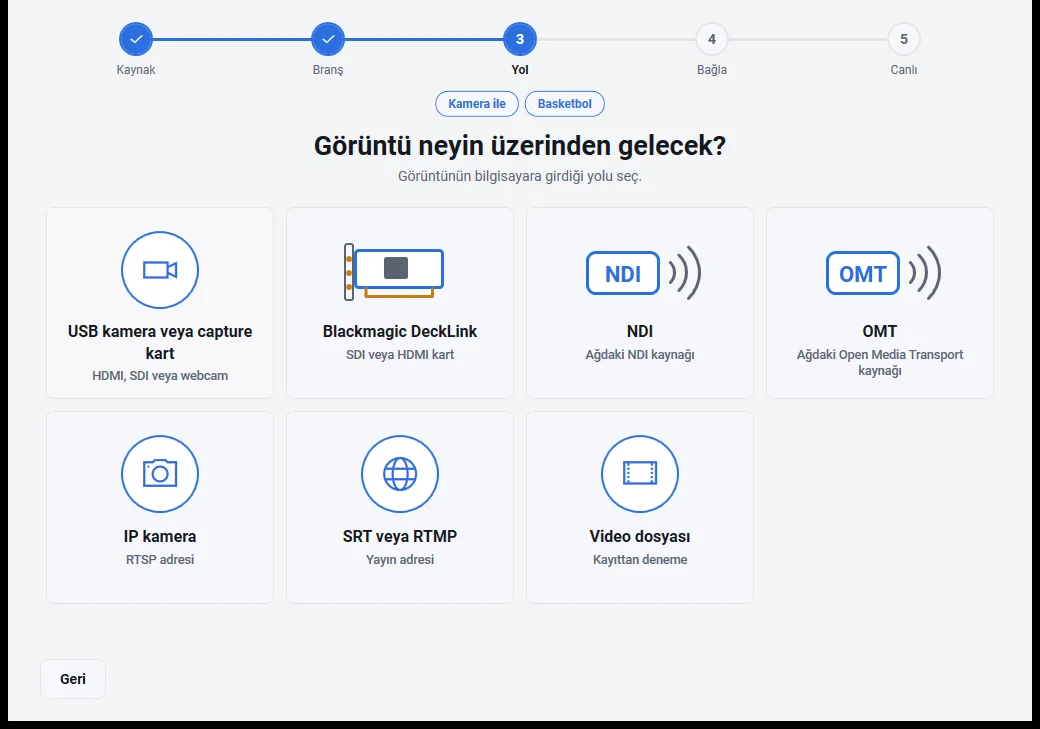
USB camera, HDMI or SDI capture card, Blackmagic DeckLink, NDI and OMT sources on the network, IP camera, SRT or RTMP stream: it works with whatever you have.
You can also open a video recording and try the setup before the game.
- USB cameras, HDMI / SDI cards, DeckLink / AJA
- NDI and OMT (finds sources on the network)
- IP camera (RTSP), SRT, RTMP
- Try it with a video file
Whatever angle the camera sees it from
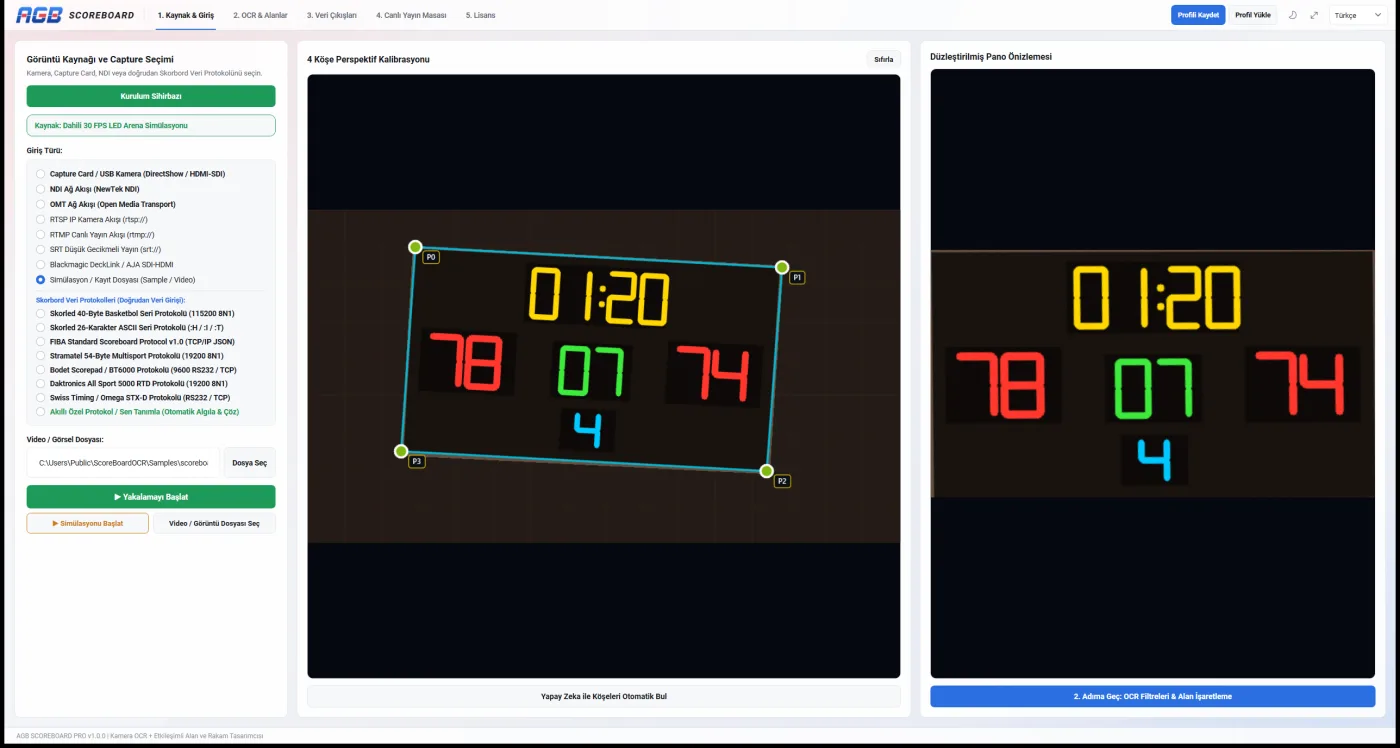
Mark the four corners of the scoreboard; the program straightens the picture as if looking at the scoreboard face on. The “find corners automatically” button does it for you.
- Perspective correction with four corners
- Finds the corners automatically
- Corrected picture in a live preview
Mark what to read
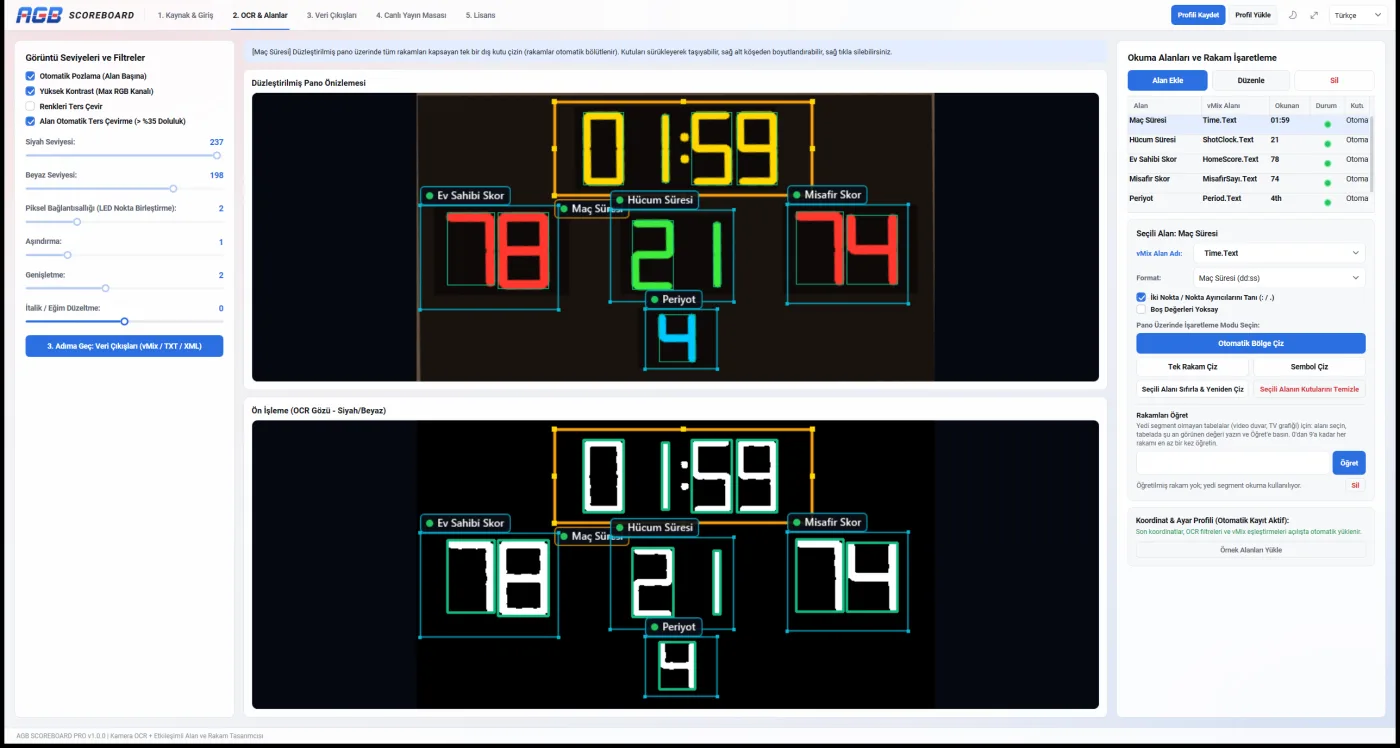
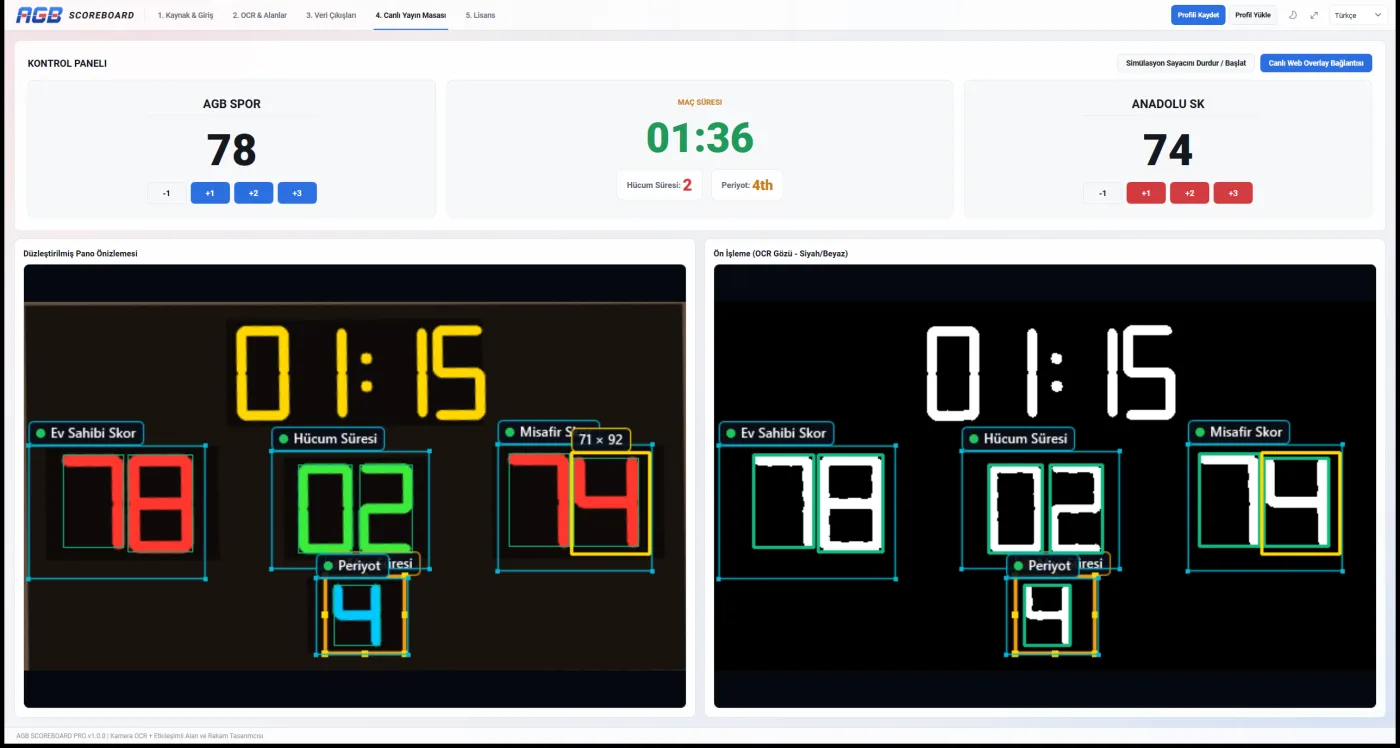
Draw boxes around the clock, scores, shot clock and period on the corrected picture; the digits are split automatically. Light and colour settings make the reading sharp for your venue.
The values read show in large type on the live desk, so you see at a glance that they are right before going on air.
- Clock, shot clock, scores, period and more
- Black / white levels, contrast, invert
- Settings saved as a profile
Adapts to different lettering
For boards without classic LED digits, such as video walls and TV graphics, select the field, type the value currently on screen and press “Teach”. Once at least six different digits have been taught, the program starts reading that board; you teach the rest as they appear. A digit that has not been taught yet is never sent to air.
- Reads video walls and TV graphics
- Learns from a few examples
- Taught digits are saved
No wrong score on air
The program doesn’t send a reading it isn’t sure of. If the camera or the scoreboard moves, it warns you; just mark the corners again.
The clock runs second by second on screen without jumps; it stops when the referee stops it and starts when it starts.
- Doesn’t send doubtful readings
- Camera-move warning
- Smooth clock tracking
Write the score into your vMix title
The program fills the text fields of your title template through vMix’s own connection. When vMix runs on the same PC, the address is already filled in.
- 1. Open your score title in vMix.
- 2. Add vMix as an output in the program.
- 3. Press “Get fields from vMix” and choose your title.
- 4. Match the score, clock and team names to the fields of the title.
- 5. Start camera reading; the fields update by themselves during the match.
Show the score as text in OBS
The program writes the clock, the scores and the period to separate text files; the OBS text source reads these files.
- 1. Add the “Multiple TXT Files” output in the program; the program shows the folder where the files are saved.
- 2. In OBS, add a Text (GDI+) source for each value.
- 3. Tick “Read from file” and choose the matching file, for example HomeScore.txt.
- 4. Set the font and colour in OBS; the values update during the match.
Camera reading
Camera reading (OCR): common questions
The most common questions about setup, connecting, the trial and buying. Can’t find your answer? Write to us.
What is OCR and how does it work in AGB Scoreboard?
OCR is the technology that reads digits and text in a picture. AGB Scoreboard reads the clock, score and period from the scoreboard your camera sees and sends them to your broadcast software. It does not send a reading it is not sure of.
How do I set up camera score reading with vMix?
Add vMix as an output in the program, choose your title with “Get fields from vMix” and match the score, clock and team name fields. Once camera reading starts, the fields fill in by themselves.
How do I set up camera score reading with OBS?
Add the “Multiple TXT Files” output in the program. In OBS, add a Text (GDI+) source for each value and choose the matching file with “Read from file”. The values update during the match.
What camera do I need?
Any camera that sees the scoreboard clearly. A fixed camera looking at the scoreboard face on or at a slight angle gives the best result.
Can I use the broadcast camera’s picture?
Yes. Feed the picture from your production desk into the program over NDI, SDI or HDMI; a separate camera that sees the scoreboard is still the most reliable.
What if the light changes?
Light and contrast settings sharpen the reading. As the program doesn’t send readings it isn’t sure of, no wrong score goes on air.
Can I use it together with console reading?
You pick one as the source. Console reading if there is a cable, camera reading if not.
Read your scoreboard with a camera
Download the program and connect your camera; every feature free for 10 days.